Fedora

How To: Stop GNOME auto-printer discovery on Fedora/Ubuntu/Mint

Note: April 8th 2022. This may no longer work. It worked at the time of writing, but my printers keep coming up again now. Modern GNOME based distros automatically discover and install printers on your network and there’s no easy way to disable this. In the past disabling cups-browsed was enough, but we also now need to

How To: Stop GNOME auto-printer discovery on Fedora/Ubuntu/Mint Read More »

Enable Secure DNS on Brave/Chromium Browsers on Fedora

Out of the box Fedora applies organisation management to Chromium based browsers, and while heading to chrome://policy doesn’t show any policies even being applied (the only one has Error as its status), browsers such as Brave will prevent you from enabling Secure DNS as long as organisation management policies are enabled showing the message “This

Enable Secure DNS on Brave/Chromium Browsers on Fedora Read More »

disable-intel-turboboost service status

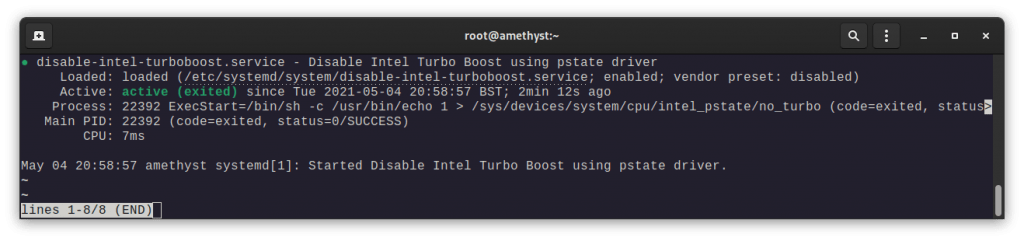
How To: Disable Intel Turbo Boost on Linux using systemd + intel_pstate

My laptop has issues with coil whine, resulting in me needing to disable Intel Turbo Boost. I usually use a GNOME Extension like CPU Power Manager but at the time of writing that extension isn’t compatible with GNOME 40, and isn’t much use for non-GNOME users. Firstly elevate to sudo with sudo -i, then: nano

How To: Disable Intel Turbo Boost on Linux using systemd + intel_pstate Read More »

How To: APFS write support for Fedora

[box type=”info” align=”” class=”” width=”100%”]Note: This guide is based on the guide made by the developer available at https://github.com/sgan81/apfs-fuse, but that guide is for Ubuntu.[/box] Download dependencies: sudo dnf install fuse fuse-devel libicu-devel bzip2 bzip2-devel cmake clang git zlib-devel Clone from Github: git clone https://github.com/sgan81/apfs-fuse.git cd apfs-fuse git submodule init git submodule update Then build:

How To: APFS write support for Fedora Read More »

Enable RPM Fusion Repositories on Fedora 32,33, and 34

RPM Fusion is a repository project offering software the Fedora team does not want to include in their own repositories. There are two different repos (free and nonfree). They’re both free as in money, but nonfree includes proprietary software. To enable the repos, use the commands below (running both is fine, but it depends on

Enable RPM Fusion Repositories on Fedora 32,33, and 34 Read More »

Install a network printer and scanner on Linux

Linux support for printers straight after an install is excellent, even on a FOSS-only distro like Fedora. To add your network connected printer, I’d recommend finding instructions from the printer manufacturer but failing that (or if you don’t want to download their driver package), you can probably get it working without downloading a single driver.

Install a network printer and scanner on Linux Read More »

How To: get exFAT drive support for Fedora 32

[box type=”info” align=”” class=”” width=”100%”]Update: Fedora 33 includes support for exFAT! 🥳🎉[/box] In 2019 Microsoft opened up the the exFAT specifications, and while exFAT drive support should be coming to the Linux kernel soon and distributions like Ubuntu include support out-of-box, Fedora does not yet support exFAT drives without a couple of extra tools. To

How To: get exFAT drive support for Fedora 32 Read More »